
Field guide · Checked 27 October 2026 for patch 1.0.4
Moon Sweepers Packager Guide
Set up a short delivery route, follow the first capsule and check the depot before extending your belt.
Moon Sweepers Packager: setup and first delivery
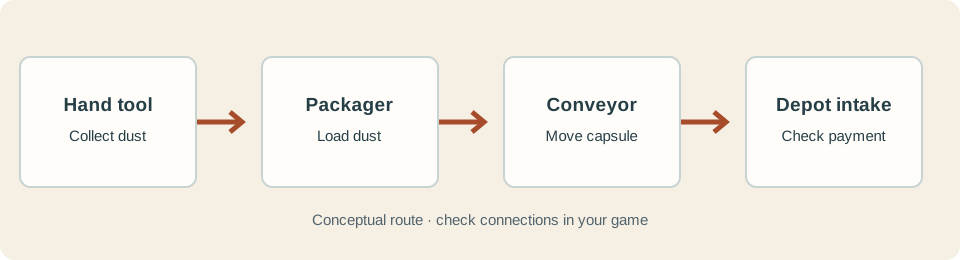
Quick answer: use a Packager to load collected dust near your work area and send capsules toward the depot by conveyor. It shortens repeated carrying trips; a working output route is part of the purchase.
Several guides report a $50 Building Tool and a $100 Packager under Logistics; check both prices and availability in your build. The Packager handles dust you bring to it: it is not a brush or a processing machine. Once the route works, compare the robot and processing layouts before adding equipment.
- Equip the Building Tool and find the Packager in Logistics. Place it close to the area you are sweeping, with room for a belt at its output.
- Connect the output to a conveyor leading to the station's receiving intake. Check each segment's direction and connection.
- Collect a small load, approach the Packager and use its interaction prompt. Guides report E by default; use your displayed binding.
- Watch the first capsule leave, travel along the belt and reach the intake. Compare the depot display and balance before extending the line.
Packager, Auto Packer or manual delivery?
Check the first capsule
- Before loading: note the balance, make sure your tool contains dust, and leave space for the outgoing belt. Reference guides identify the output at the rear; verify the port and direction in your build.
- At the Packager: use the shown loading prompt and watch the tool gauge decrease. Guides report that capsules may leave over time, so allow the first one to appear.
- At each hand-off: watch the capsule move along every section. At a junction, check that the destination branch is connected and not blocked.
- At the depot: watch the capsule enter the intake and compare the screen and balance. Patch 1.0.3 says dust and stone arriving by belt are paid as they arrive.
Plan for the Building Tool, Packager and the full belt, not just the machine price. Check the cost and build menu in your save; different guides give incomplete or inconsistent information about power and other requirements.
Still stuck? If the tool does not unload, check that it contains dust and that you are using the loading prompt. If no capsule appears, check the output and connected belt. If it stops en route, inspect direction and joins. If it reaches the end without payment, check that the belt actually enters the receiving intake. Record the version and exact message before changing several parts at once.
These setup steps combine reference-guide reports with the developer's patch notes. They have not been independently play-tested; check your build and on-screen prompts. For a stopped line, see the conveyor troubleshooting checklist.